

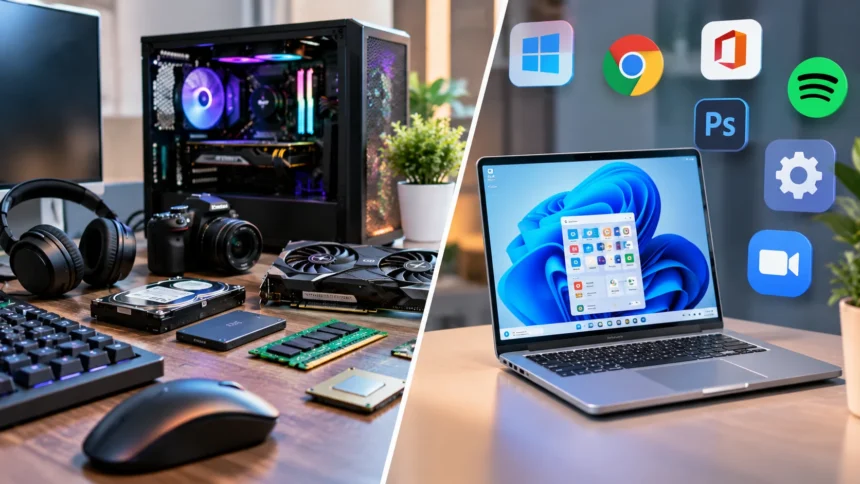
Hardware and software are the two essential components that make computers, smartphones, and other digital devices work. Hardware refers to the physical parts of a computer system, such as the processor, keyboard, monitor, and storage drive. Software includes the programs, applications, and instructions that tell these physical components what to do. Both work together to perform everyday computing tasks.
Understanding the differences between hardware and software helps users make better decisions about technology, troubleshooting, and computer maintenance. Although they perform different functions, neither can provide a complete computing experience independently. From opening a web browser to editing documents or playing videos, every digital activity depends on their interaction. This guide explains their meanings, types, examples, functions, and key differences in simple terms.
What Is Hardware in a Computer?
Hardware refers to the physical components of a computer or electronic device that can be seen and touched. These components form the structure of the system and perform essential processing, storage, input, and output functions. Examples include the motherboard, central processing unit, memory modules, keyboard, and display. Each component contributes to the overall operation of the device.
Computer hardware works by receiving, processing, storing, and transmitting electronic signals. The processor executes instructions, while memory temporarily holds information needed by active programs. Storage devices retain files and applications for future use. These components operate together through electrical connections and communication systems that allow information to move throughout the computer.
Hardware can exist inside or outside a computer’s main enclosure. Internal components include processors, storage drives, and cooling systems, while external devices include monitors, printers, and keyboards. Some hardware components are built directly into laptops and smartphones. Understanding these categories helps users identify equipment and recognize its role in everyday computing.
More Read

What Is Software and How Does It Work?
Software refers to the digital programs, instructions, and data that direct computer hardware to perform specific operations. Unlike physical equipment, software cannot be touched as a separate mechanical component. It exists as digital information stored on electronic devices. Common examples include operating systems, web browsers, word processors, games, and communication applications.
Software works by providing instructions that the computer’s processor can execute. These instructions tell the system how to handle information, display content, and respond to user actions. For example, clicking a button in an application may trigger several processing operations. The software coordinates these actions through the operating system and available hardware resources.
Different software programs serve different purposes, ranging from basic system management to specialized professional tasks. Some applications help users write documents, while others support graphic design, programming, or financial calculations. Software may be installed locally or accessed through online services. Regardless of its purpose, it relies on compatible hardware and supporting system components to function.
More Read
Hardware vs. Software: The Main Differences
The most important difference between hardware and software is their physical nature. Hardware consists of tangible electronic components, while software consists of digital instructions and programs. A keyboard is hardware because it is a physical input device. A typing application is software because it processes input and displays information according to programmed instructions.
Hardware and software also differ in how they are developed and maintained. Hardware is manufactured using physical materials, electronic circuits, and mechanical components. Software is created through programming, testing, and digital development processes. Hardware problems may require physical repairs or replacement, while software issues can sometimes be resolved through updates or configuration changes.
Another distinction involves how each component changes over time. Hardware typically requires physical modification or replacement to improve its capabilities significantly. Software can often be updated remotely without changing the device’s physical structure. However, software improvements may require more powerful hardware as technical demands increase. Both components influence system performance, reliability, and long-term usability.
Different Types of Computer Hardware
Computer hardware is commonly divided into input, output, processing, storage, and communication components. Input devices allow users to provide information, while output devices present results. Processing components perform calculations and execute instructions. Storage devices preserve digital information, and communication hardware allows computers to exchange data with other devices.
Input hardware includes keyboards, mice, microphones, scanners, and touchscreens. Output hardware includes monitors, speakers, projectors, and printers. Some devices, such as touchscreens, perform both input and output functions. These categories help explain how information enters a computer system and how processed results become available to users.
Internal hardware includes processors, memory, motherboards, graphics cards, and storage drives. Network adapters and wireless communication components enable connections to local networks and the internet. Cooling equipment helps manage heat produced by electronic components. Each hardware category performs a different function, but its importance depends on the intended purpose of the computer system.
More Read
Different Types of Computer Software
Computer software is commonly classified into system software, application software, and programming software. System software manages essential computer operations and provides a foundation for other programs. Application software helps users perform specific tasks. Programming software provides tools that developers use to create, test, and maintain other software products.
Operating systems are important examples of system software because they manage hardware resources and support applications. Windows, macOS, Linux, Android, and iOS are widely recognized operating systems. They coordinate memory, files, processing tasks, and connected devices. Without suitable system software, most modern computers would be difficult for ordinary users to operate.
Application software includes web browsers, office programs, media players, messaging tools, and editing applications. Programming tools include code editors, compilers, debuggers, and development environments. Some software products combine features from several categories. Understanding these differences helps users identify which programs support basic operations and which provide specialized functionality.
How Hardware and Software Work Together
Hardware and software depend on one another to create a functional computing system. Hardware provides the physical resources needed to process instructions, while software determines how those resources are used. When someone opens an application, the processor executes instructions and memory stores information needed during operation. The display then presents the resulting interface.
Consider what happens when a user types a document on a laptop. The keyboard detects physical input and sends signals to the computer. The operating system and word-processing application interpret those signals and update the document. The monitor displays the text, while the storage device can preserve the file for future use.
This relationship extends to smartphones, gaming systems, smart televisions, and industrial equipment. Each device uses hardware to perform physical operations and software to coordinate specific functions. A problem with either component can interrupt the entire process. Understanding their connection makes it easier to recognize why computer systems require both reliable equipment and properly functioning programs.
Examples of Hardware and Software in Everyday Life
A smartphone provides a useful example of hardware and software working together. Its hardware includes the touchscreen, processor, battery, cameras, speakers, and memory components. Its software includes the operating system, messaging applications, camera interface, and navigation tools. Together, these components allow users to communicate, take photographs, and access digital services.
A desktop computer provides another familiar example of this relationship. The monitor, keyboard, mouse, processor, and storage drive are hardware components. The operating system, spreadsheet application, and web browser are software. A user can complete different tasks by running suitable programs on the same physical computer.
Smart televisions, digital watches, and modern vehicles also combine hardware with specialized software. A smart television uses electronic components to display images while applications provide streaming and navigation features. Digital watches use sensors and software to process activity information. These examples demonstrate how hardware and software support technologies beyond traditional personal computers.
What Is the Role of the CPU, RAM, and Storage?
The central processing unit, commonly called the CPU, is responsible for executing many of the instructions required by computer programs. It performs calculations, processes data, and coordinates operations across different system components. CPU capabilities can influence how efficiently a computer handles demanding tasks. However, overall performance also depends on memory, storage, software, and other hardware.
Random access memory, or RAM, provides temporary storage for information that active programs need quickly. When applications open, relevant data and instructions are loaded into memory for processing. Having sufficient RAM helps a system manage multiple tasks without relying excessively on slower storage. Its contents generally disappear when the device loses power.
Storage devices preserve operating systems, applications, documents, and other files for longer periods. Solid-state drives and hard disk drives are common storage technologies used in computers. Unlike RAM, they retain information when the computer is turned off. The balance between processing power, memory capacity, and storage performance influences how smoothly software operates.
Operating Systems: The Connection Between Hardware and Software
An operating system is essential software that manages the basic functions of a computer or digital device. It creates an environment where applications can run and users can interact with hardware. The operating system manages tasks involving memory, processors, storage, and connected devices. It also provides important features for file organization, security, and system configuration.
Device drivers help operating systems communicate with particular hardware components. For example, a printer driver allows the operating system to send appropriate instructions to a compatible printer. Graphics drivers support communication with display hardware and graphics processors. These software components translate system requests into operations that hardware devices can understand.
Operating systems also provide user interfaces that simplify interaction with complex computer systems. Users can open programs, organize folders, change settings, and connect devices through graphical controls. Behind these familiar actions, the operating system coordinates multiple technical processes. This makes it a central link between physical hardware capabilities and everyday software functionality.
Hardware and Software Installation and Upgrades
Hardware upgrades involve adding, replacing, or modifying physical components within a computer system. Common examples include installing additional memory, replacing a storage drive, or upgrading a graphics card. These changes may improve performance or expand available capabilities. However, compatibility with the motherboard, power supply, and operating system must be considered.
Software installation involves placing a program and its required files on a compatible device. Users may install applications from trusted software providers or official application stores. Updates can introduce new functions, correct errors, and address security vulnerabilities. Unlike hardware replacement, software updates generally do not require opening or physically modifying the computer.
Both hardware and software upgrades require planning to avoid compatibility problems. New applications may need more memory or processing power than an older device provides. Similarly, newly installed hardware may require updated drivers or operating system support. Checking system requirements before making changes helps prevent unnecessary expenses and technical difficulties.
Common Hardware Problems and Their Solutions
Hardware problems can cause performance issues, unexpected shutdowns, and difficulties using connected devices. Common examples include overheating, damaged cables, failing storage drives, and malfunctioning peripherals. These problems may produce noticeable physical symptoms or system errors. Identifying the affected component is an important step before attempting repairs or replacing equipment.
Simple troubleshooting sometimes involves checking connections, restarting devices, or confirming that equipment receives power. External keyboards, monitors, and printers may stop working because of loose cables or connection problems. However, internal hardware repairs can involve electrical hazards or fragile components. Complex problems should be handled by qualified technicians rather than through unsafe experimentation.
Preventive maintenance can help reduce some hardware-related problems over time. Keeping ventilation openings clear, protecting devices from moisture, and handling equipment carefully are useful habits. Important files should also be backed up in case storage hardware fails unexpectedly. Regular maintenance supports reliable operation but cannot completely prevent physical components from wearing out.
Common Software Problems and How to Fix Them
Software problems may appear as frozen applications, unexpected error messages, slow performance, or compatibility issues. These difficulties can result from outdated programs, corrupted files, conflicting settings, or insufficient system resources. Some problems affect one application, while others influence the entire operating system. Identifying when the issue began can help narrow down its possible cause.
Restarting an application or computer can sometimes resolve temporary software problems. Installing official updates may correct known bugs and improve compatibility. Checking available storage space and reviewing application requirements can also be useful. However, repeated crashes or unusual behavior may require more detailed troubleshooting and professional support.
Security-related software problems deserve particular attention because malicious programs can compromise information and system functionality. Using trusted applications, maintaining updates, and avoiding suspicious downloads help reduce these risks. Reliable backups provide additional protection against data loss. Good software maintenance combines preventive habits with appropriate action when unusual problems appear.
How Hardware and Software Affect Computer Performance
Computer performance depends on how efficiently hardware resources and software requirements work together. A powerful processor may support demanding applications, but insufficient memory can still cause slowdowns. Storage speed also influences how quickly programs open and files load. These factors explain why improving one component does not always solve every performance problem.
Software design and optimization are equally important for a responsive computer. Poorly optimized applications may consume excessive memory or processing resources even on capable devices. Background services and unnecessary startup programs can also influence performance. Keeping software updated and reviewing system activity may help identify avoidable resource consumption.
The best computing experience usually comes from balancing hardware capabilities with realistic software needs. Basic tasks such as browsing and document editing often require fewer resources than video editing or complex simulations. Understanding these differences helps users choose suitable systems. Effective performance planning focuses on actual activities rather than assuming the most expensive components are always necessary.
Hardware and Software Security: Why Both Matter
Hardware and software security work together to protect computer systems and sensitive information. Hardware-based security features may include trusted platform modules, biometric sensors, and specialized encryption support. Software security includes access controls, operating system protections, and security applications. Combining these measures can strengthen protection against different types of threats.
Software vulnerabilities can expose systems to unauthorized access, malware, and data theft. Installing security updates helps address known weaknesses in applications and operating systems. Strong passwords, multifactor authentication, and careful downloading habits provide additional protection. However, software security is most effective when supported by properly configured and maintained hardware.
Physical security is also important because stolen or damaged devices can compromise information and interrupt work. Device encryption and secure login systems can help protect data when equipment is lost. Organizations may use additional safeguards to manage workplace devices and access permissions. Understanding both hardware and software security encourages a more complete approach to digital protection.
Conclusion
Hardware and software are different but closely connected parts of every modern computer system. Hardware includes the physical equipment responsible for processing, storage, input, and output. Software provides the digital instructions and programs that control how those components operate. Both are essential for performing everyday activities on computers, smartphones, and other electronic devices.
Understanding their differences helps users troubleshoot problems, evaluate upgrades, and choose suitable technology. Hardware issues may involve damaged components or physical limitations, while software problems often involve programs, settings, or compatibility. Their performance and reliability depend on how effectively they work together. Regular maintenance and appropriate updates can support a smoother computing experience.
As digital technology continues to develop, hardware and software will remain essential to innovation. Improvements in processors, memory, applications, and operating systems create new possibilities for communication, business, and entertainment. Learning these basic concepts provides a useful foundation for understanding modern devices. Whether using technology at home or work, knowing how hardware and software interact makes computing easier to understand.
Frequently Asked Questions (FAQs)
What is the main difference between hardware and software?
Hardware refers to the physical components of a computer that can be touched, such as a keyboard or processor. Software consists of digital programs and instructions that control hardware operations.
What are five examples of computer hardware?
Five common hardware examples are the CPU, motherboard, RAM, keyboard, and monitor. These components support processing, communication, memory, input, and output functions within a computer system.
What are five examples of computer software?
Five examples of software are Microsoft Windows, Google Chrome, Microsoft Word, Adobe Photoshop, and VLC Media Player. These programs provide operating system functions or help users complete specific digital tasks.
Can hardware work without software?
Hardware can perform limited functions through built-in electronic logic, but most modern computers require software or firmware for useful operation. Operating systems and applications coordinate complex tasks and user interactions.
Which is more important, hardware or software?
Neither is universally more important because both contribute essential functions to modern computing. Hardware provides physical capabilities, while software directs those capabilities to perform meaningful tasks for users.