

Creating eye-catching digital content no longer requires expensive equipment or years of design experience. Artificial intelligence is opening new opportunities for people who want to produce creative images, animated characters, and engaging videos. Whether you are a social media creator, graphic designer, or small business owner, AI-powered tools can help turn simple ideas into attractive visual content.
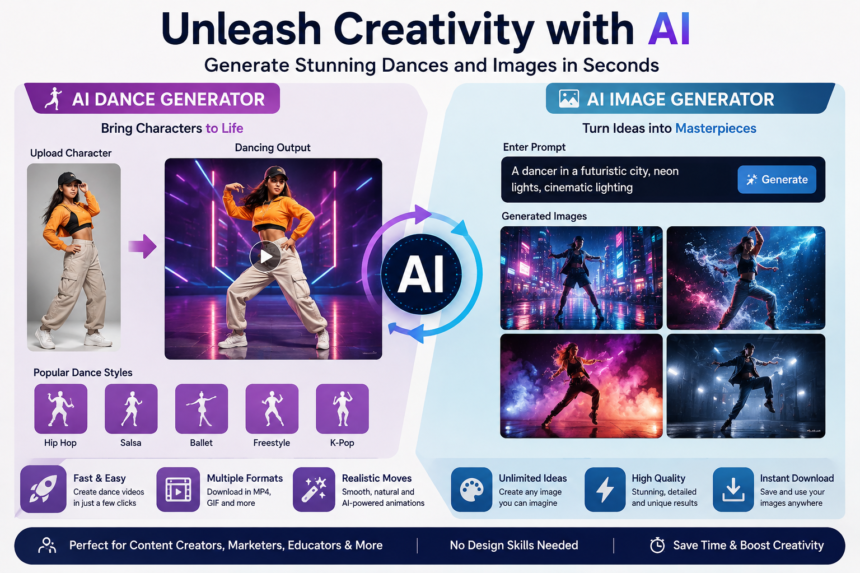
An AI dance generator makes it possible to create dance animations using supported images, characters, or motion templates. Meanwhile, an AI image generator helps transform written descriptions into original-looking visual concepts. Although these tools serve different purposes, using them together can make digital content creation more flexible, accessible, and enjoyable.
Understanding the New Era of AI Creativity
Traditional digital production often involves several steps, including planning, designing, animating, editing, and exporting. Each stage can require specialized software and technical knowledge.
AI tools simplify parts of this process by automating selected creative tasks. Users can describe what they want, choose available settings, and let the software generate an initial result.
For example, someone creating a music-themed social media campaign might need a colorful character illustration and a short animated performance. An AI image generator can help develop the visual concept, while an AI dance generator can help bring a compatible character to life.

These tools do not eliminate the need for creative judgment. Instead, they provide a starting point that users can refine to match their ideas and audience.
What Makes an AI Dance Generator Useful?
An AI dance generator is designed to produce or assist with dance animations. Depending on the platform, users may be able to animate a character from an image, apply predefined movements, or generate short videos featuring dancing figures.
This technology can be particularly useful for creators who want to experiment with different dance styles without manually animating every movement.
For instance, a creator could prepare a digital avatar, select a supported hip-hop or freestyle motion template, and generate a short animation. The result could then become part of a music video concept, entertainment post, or promotional campaign.
Popular applications include:
- Creating animated characters for short videos.
- Producing entertaining social media content.
- Developing concepts for music-related promotions.
- Experimenting with virtual avatars and digital performers.
- Preparing visual demonstrations for creative projects.
The quality of the animation depends on the source image, available motion models, and the platform’s capabilities. Some tools may struggle with complex poses, unusual clothing, or fast movements, so reviewing the final video is important.
Exploring the Creative Possibilities of an AI Image Generator
An AI image generator creates visual content from text prompts, reference images, or other supported inputs. Instead of designing every element manually, users describe the subject and appearance they want.
A useful prompt can include the setting, lighting, colors, composition, mood, and artistic style.
For example, a prompt describing a dancer performing on a futuristic stage with glowing blue lights and a purple background can guide the system toward a specific visual direction.
AI image generation supports many creative tasks, including:
Digital illustrations: Create concepts for characters, fantasy environments, and imaginative scenes.
Social media graphics: Develop visuals for posts, stories, and promotional campaigns.
Website artwork: Produce visual concepts for banners, landing pages, and blog illustrations.
Product concepts: Explore possible packaging designs, advertising scenes, and presentation ideas.
Personal projects: Experiment with portraits, wallpapers, and creative artwork.
Different tools offer different levels of control. Some allow users to adjust aspect ratios, image references, styles, and generated variations. Checking these features before choosing a platform can help you find the right option.
Combining Image Creation with Dance Animation
One exciting approach is to use image generation as the first stage of a larger creative project.
Imagine creating a virtual performer for a short entertainment video. Rather than starting with a camera recording, you can develop the character’s appearance digitally and then explore animation options.
Here is a practical workflow:
Step 1: Develop the concept. Decide what kind of character, environment, and visual style fit your project.
Step 2: Generate the image. Use an AI image generator to create a suitable character or scene. Describe clothing, colors, pose, and background clearly.
Step 3: Select an animation tool. Choose an AI dance generator that accepts your image format and supports the type of movement you want.
Step 4: Apply the dance movement. Select a compatible dance template or motion option and generate the animation.
Step 5: Review the video. Check whether the character’s face, body proportions, and movements remain visually consistent.
Step 6: Edit the final content. Add captions, transitions, sound, or branding using an editor that supports your preferred output format.
This workflow can reduce the amount of manual work involved in producing a creative video. However, not every image generator produces animation-ready images, so some experimentation may be necessary.
Tips for Better AI-Generated Results
The quality of your output often begins with the clarity of your instructions. A vague prompt may produce an image that looks attractive but does not match your original idea.
Use specific descriptions instead of general requests. For example, describe a dancer’s outfit, the stage lighting, the camera perspective, and the intended atmosphere.
When generating images for animation, consider the character’s pose and visibility. A clear image with a recognizable subject may be easier for some animation tools to process than a crowded scene.
Consistency is also important. If you are developing several images for the same project, reuse similar descriptions for clothing, colors, and character features.
Finally, review every result before publishing it. Look for distorted hands, inconsistent facial features, unnatural movement, and unexpected objects. Minor edits can make AI-generated content more professional.
Choosing the Right Tools for Your Project
Before selecting an AI dance generator or AI image generator consider your specific requirements.
Look for supported input formats, output quality, generation speed, available creative controls, and pricing. Some services offer free trials or limited free generations, while others require subscriptions for additional features.
Privacy deserves attention as well. Review how uploaded images are stored and processed, particularly when working with personal photographs or confidential business material.
If you intend to publish or monetize your content, check the platform’s usage rights. You should also have permission to use other people’s photographs and verify that music, logos, and other protected materials can be used legally.
Selecting a tool based on your actual workflow is usually more effective than choosing one simply because it offers the largest number of features.
The Future of AI-Powered Visual Content
AI-assisted creation is becoming an increasingly useful option for independent creators, marketers, educators, and digital artists. As these systems improve, workflows may become more integrated, allowing users to move more easily between image creation, animation, and editing.
Nevertheless, human creativity remains important. AI can generate visual possibilities, but people still decide which concepts communicate the right message, represent their brand, and connect with their audience.
Creators who combine experimentation with careful editing can use these technologies to explore new ideas without losing control over the final result.
Conclusion
An AI dance generator and an AI image generator provide complementary ways to create engaging digital content. One focuses on movement and animation, while the other helps turn written ideas into visual artwork.
By choosing suitable tools, writing clear prompts, and reviewing generated results carefully, users can develop creative images and animated videos for entertainment, marketing, and personal projects. The best results come from treating AI as a creative assistant rather than relying on automation alone.
With a clear concept and a thoughtful workflow, even beginners can explore new visual styles and produce content that reflects their imagination.