

Artificial intelligence has revolutionized digital creativity, making it possible for anyone to generate high-quality images from simple text prompts. Free AI image generation tools have become increasingly popular among designers, marketers, educators, content creators, and hobbyists who want to create unique visuals without advanced graphic design skills.
Although many AI image generators offer free access, their features, image quality, usage limits, and customization options vary significantly. Understanding these differences can help users choose the right tool for their creative projects.
What Are AI Image Generation Tools?
AI image generation tools use machine learning models to create images based on written descriptions, reference images, or user instructions.
By analyzing large datasets during training, these systems learn patterns related to objects, colors, lighting, artistic styles, and compositions. Users simply provide a prompt, and the AI generates one or more images that match the description.
Many platforms also support image editing, background removal, style transfer, and image enhancement.
More Read
Why Free AI Image Generators Are Popular
Free tools make AI-powered creativity accessible to a wide audience.
They allow users to experiment without purchasing expensive software or hiring professional designers. Small businesses, students, bloggers, and social media creators often use free AI image generators to produce marketing materials, illustrations, concept art, and educational content.
As AI technology continues to improve, free versions are becoming more capable while remaining easy to use.
More Read
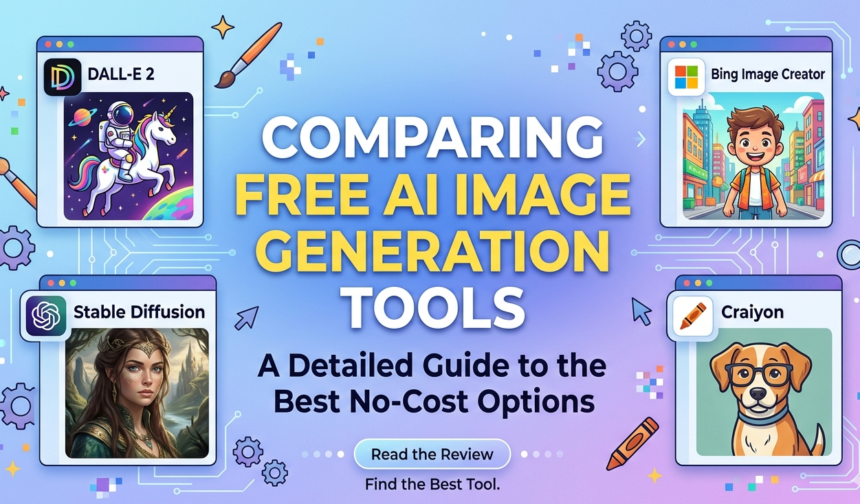
Popular Free AI Image Generation Tools
Several well-known platforms offer free image generation, although features and availability may change over time.
Some commonly used options include:
- ChatGPT Image Generation
- Microsoft Designer
- Adobe Firefly (free tier)
- Canva AI Image Generator
- Playground AI
- Leonardo AI (free plan)
- Craiyon
Each platform offers different strengths, including artistic styles, editing tools, or commercial usage options. Users should review the current terms, feature availability, and usage limits before selecting a platform.
Image Quality
Image quality is one of the biggest differences between AI generators.
Some platforms produce highly realistic images with detailed textures and accurate lighting, while others focus on artistic illustrations, sketches, or creative styles. Higher-quality tools generally offer better prompt understanding and more consistent results.
The ideal choice depends on the intended use of the image.
More Read
Ease of Use
Most AI image generators are designed for beginners.
Simple interfaces allow users to enter a text prompt, select an image style, and generate results within seconds. Some platforms also provide prompt suggestions and editing features that make image creation even easier.
A user-friendly interface reduces the learning curve for new users.
Customization Options
Many AI tools allow users to control the appearance of generated images.
Common customization features include:
- Aspect ratio selection
- Artistic styles
- Background editing
- Image upscaling
- Prompt refinement
- Color adjustments
More advanced platforms may also support image-to-image generation and detailed editing controls.
Commercial Usage
Not every free AI image generator permits commercial use.
Some platforms allow users to use generated images for business purposes, while others restrict commercial rights or require paid subscriptions. Reading the licensing terms before publishing or selling AI-generated content is essential.
Understanding licensing helps avoid copyright or usage issues.
Advantages of Free AI Image Generators
Free AI tools provide several benefits.
- Easy access for beginners
- Rapid image creation
- Reduced design costs
- Support for creative brainstorming
- Useful for blogs and social media
- No advanced design experience required
These advantages make AI image generation attractive for individuals and businesses alike.
Limitations to Consider
Despite their strengths, free AI image generators have some limitations.
Many platforms impose daily image limits, slower generation speeds, watermarked outputs, or restricted editing capabilities. Free versions may also provide lower image resolution than paid plans.
Generated images can occasionally contain visual errors or fail to accurately interpret complex prompts.
Tips for Better AI Images
Writing effective prompts greatly improves image quality.
Describe the subject clearly, include details about lighting, colors, composition, style, and mood, and refine prompts through experimentation. Small changes in wording can produce significantly different results.
Review generated images carefully before using them in professional projects.
Choosing the Right Tool
The best AI image generator depends on your goals.
Bloggers may prioritize speed and simplicity, while designers may require advanced editing features. Businesses often value commercial licensing, and educators may prefer platforms that are easy for students to use.
Comparing features, image quality, and licensing terms helps you choose the most suitable option.
The Future of AI Image Generation
AI image generation continues to evolve rapidly.
Future tools are expected to produce even higher-quality visuals, improved prompt understanding, faster generation speeds, better editing capabilities, and stronger integration with creative software. Responsible AI development will also continue to address issues such as transparency, copyright, and content authenticity.
As technology advances, AI image generators are likely to become an increasingly valuable part of creative workflows.
Conclusion
Free AI image generation tools have made digital creativity more accessible than ever. Whether you need illustrations, marketing graphics, concept art, educational visuals, or social media content, there are many platforms available to suit different needs and skill levels.
Before selecting a tool, consider image quality, customization options, commercial licensing, ease of use, and usage limits. By choosing the right platform and writing clear prompts, you can create impressive AI-generated images while making the most of today’s powerful creative technologies.
Frequently Asked Questions (FAQs)
1. What is an AI image generation tool?
An AI image generation tool uses artificial intelligence to create images from text prompts or other user inputs.
2. Are free AI image generators really free?
Many platforms offer free plans, but they often include usage limits, reduced features, or watermarked images. Premium subscriptions usually unlock additional capabilities.
3. Which free AI image generator is best?
The best choice depends on your needs. Some tools focus on realistic images, while others specialize in artistic styles, editing features, or ease of use.
4. Can I use AI-generated images commercially?
It depends on the platform’s licensing terms. Always review the current usage policy before using AI-generated images for commercial purposes.
5. How can I improve AI-generated image quality?
Use detailed prompts that describe the subject, lighting, style, colors, composition, and mood. Experimenting with prompt wording often leads to better results.
6. Will AI image generators replace graphic designers?
AI image generators are valuable creative tools, but they do not replace the expertise, creativity, strategic thinking, and problem-solving skills of professional designers. Many designers use AI to enhance and speed up their creative workflows rather than replace them.